
In August of 2018 I wrote a blog post chronicling my personal history with desktop computers. And another one talking about building the computer I called Dream. Six years is a long time. There’s no mystery as to why I’m here. Dream is being retired! Let us give Dream its send-off, and talk about the changes in my computing life along the way. Fair warning: there’s more than a little bit of reflected grief in this overly-long blog post. You’ll see what I mean.
Dream (2018 – 2024)
Even sparing almost no expense, I didn’t truly intend for this machine to be the longest-lived of all of my PCs. The plan was always to stick to the five year cycle. It just so happened that a lot of events conspired against ole Dream to keep it in service longer than its intended lifespan, mostly changes in my behavior.
Am I less interested in computers? Absolutely not. I’ve spent more time coding and writing for personal hobbies in the past six years than in the decade prior. I rebuilt and over-engineered my home server last year, something I took pictures from so I could write about it here and never did. Hell, I even bought a laptop again. What I am doing far less often than in 2018 is gaming on my computer, for anything other than my core PC genres of things like Slay the Spire or Crusader Kings.
During the early part of the pandemic, when there was nothing to do but sit in our house and distract ourselves, Holly and I found the joy in console gaming again. For me, that meant playing games on the couch. For her, that meant watching me play games from the couch. At first this made me feel ridiculous: we watch TV together, sure, but why would you be watching me do something active? But, no, she genuinely enjoys this, apparently. When she actually got COVID I had to stream Persona 5 on Twitch so that she could watch it from the isolation chamber we banished her to. I didn’t switch from being a primarily-console gamer to a primarily-PC one until 2008 or so, when Steam sales really got nuts and I had enough disposable income to afford gaming components that weren’t out of date in a month and half. As much of a change as it was to go back to the couch and controller, it was more of a coming home than anything else.
Instead of fighting it, I leaned into it. In the summer of 2021 we refinished our entire basement, focusing primarily on two new spaces: a gaming room, for board games, and a home theatre. Into the home theatre went a 77” OLED TV and a PlayStation 5. My couch gaming setup was now miles better than my PC gaming setup, and has been since then. It’s really hard to beat that giant OLED.
If my computer wasn’t showing its age in gaming, did that mean I wasn’t worried about or noticing any differences in performance? Well, no. Dream was still my home hub for all of my tinkering, my research, my photography. I shoot less on my X-T2 than I used to—and yes, it’s still an X-T2—, but I spend a lot of time every year doing portrait shoots, travel photography, photo editing, and the like. After 5 years, Lightroom Classic was really starting to slow down, despite still using the same cameras. Part of it was library sizes, part of it was a hardware error I didn’t discover until after I bought a new computer, which you can read about in the Thoughts section below, but mostly it was dozens of paper cuts. On Delight (2013), editing those RAWs meant waiting forever in comparison view while noise reduction calculations were performed. That problem remained solved, but instead, I was waiting forever to generate a few hundred 1:1 previews on import. Not quite the same thing, but noticeable.
What was I actually waiting on? Myself, stalling on making a decision. I could spend an entire article complaining about how Microsoft has been pissing me off lately, advertising features and settings to me I don’t give a shit about, turning on search ads despite me constantly turning them off. I spent a few months getting pop-ups for Minecraft despite all relevant settings being off. Windows 11 is mostly regressions. It’s one of the reasons I got a Mac laptop last year. Windows has been bad before, after all, and I’m platform agnostic. When Windows XP was current, I preferred OS X. When Windows 8 was the newest, I hated both OS X and Windows for a bit, staying on Windows 7 mostly by inertia. Going to the Mac on a desktop wouldn’t be the weirdest thing I’ve ever done.
I kept waiting on something to happen to make me upgrade. Kenny and I were on the same cycle, so maybe he would give me the push I needed. Only, he died instead. And before he died, he told me to buy a Mac, because he was even more pissed at Microsoft than I was. One of the last things we were talking about, days before he passed, was about how I was pretty sure I was going to buy a Mac Studio, but I was waiting for it to get the M3 Max rather than the M2 Max, as it was already old by then. Hilariously, it’s exactly one year later, and the Studio still only has the M2.

One thing I was absolutely sure of was that I wanted to reclaim space from my desk, so whatever I built next had to be much smaller. I kicked around the idea of building a new computer in the Fractal Terra case because it’s awesome, but never pulled the trigger.
Last December I had a chance to test the waters a bit. Instead of upgrading my computer, I decided to finally renovate my home office instead. When we moved into this house in 2013 it had been a nice setup with a single computer for me to work from sometimes, play games from sometimes, and do whatever else. The desks were the same ones I’d had since 2004, which my dad had grabbed for me when his office was replacing them. They were heavy, gigantic, and by the last move literally falling apart and bowing inward. I loved them anyway.
I started working from home more often in 2018. I changed jobs and joined my current company, where my entire team was remote. I couldn’t remote in from my home computer for security reasons, so that mostly meant using my work laptop from the couch. At my office-office, I had a nice standing desk I’d customized for myself, multiple monitors, a Thunderbolt dock, the whole shebang. At home I had a side credenza that was 20 inches deep that I kept a typewriter on. No one wanted to work from that.
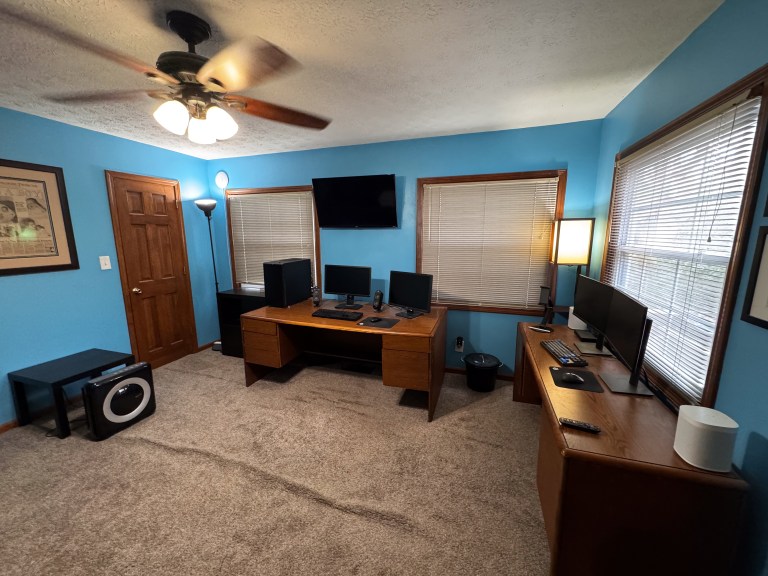
Stop me if you’ve heard this one before: 2020 changed everything. Now I was working from home every single day, obviously. My office-office closed forever. The standing desk I kept there wouldn’t fit in the space I had to use in my home office, not without also replacing my gigantic main desk, so I setup two monitors, an iPad stand, and a compact mechanical keyboard on that tiny little 20-inch credenza. I worked there for four years.
Every December I end up deliberately burning all of the vacation time I’ve accrued during the year rather than carrying any over. This usually means I have 2-3 weeks off for the month. For 2023, we used this time to renovate not just my office, but the living room as well. We ripped out the carpet and had new hardwood floors installed. I made the hard decision to finally move my ancient desks to the curb—quite literally—and buy not one but two new ones, for a dedicated work space and home space. Two new standing desks, with the only difference being the length. I kept my home one larger, mostly to have somewhere to put my giant desktop tower.

Anyway, to end this tangent, while all of the construction was going on and I was waiting for my desks to actually arrived, I hooked up a temporary home AND work computing station on a folding table. Two Thunderbolt cables, one for my work laptop, and one for my MacBook Air, connected to one docking station. It would be a good test to see if I could live full-time in the Mac environment again rather than merely vacation there.
Honestly? It went great. Did I miss some things? Absolutely. But I also got to experience how nice some things were that I never noticed while dipping in and out. Peter introduced me and Kenny to the Advent of Code puzzles that December, so I was spending hours a day coding in VS Code on my Mac, making myself stretch my wings and learn Python because my primary languages at work were both Windows-centric. It was a great stress test.
Those puzzles were the very last things I talked to Kenny about, for hours each day until he mysteriously went silent. When I went through his things at his house for his family, I found his desk covered in graph paper from manually mapping out some of the solutions. I had to stop doing them after that, until this year. But I digress, again.

Once everything was finished in the offices I hooked up my old PC and went back to normal, other than trying a brief stint of switching back and forth between the Air and Dream with a KVM. Waiting for Apple to release the M3 Mac Studio update. Which, of course, never happened, as stated above. But something else DID happen: Trump won the election, and suddenly I wanted to upgrade sooner rather than later not only because Dream was getting real old now, but also because tariffs are a dumb idea he’s apparently fully committed to, meaning literally anything I might buy was about to get 30% more expensive. Oh, also, Apple released the M4 Mac Mini. But that’s the next section, which we’re finally arriving at. Let’s finish up Dream in the traditional style of our people.
SPECIFICATIONS
- AMD Ryzen 7 2700X 3.7GHz / 4.3 GHz Boost (Pinnacle Ridge)
- Asus X470 motherboard
- 32GB of RAM (G.Skill Trident Z)
- EVGA 11GB GeForce GTX 1080 Ti SC
- Samsung 970 Evo 1TB M.2 NVME SSD
- Western Digital 2TB M.2 SATA SSD
MEMORIES
- The Wraith Prism cooler from the build pictures didn’t last very long. I installed a giant NH-D15 that I got as a gift from Holly’s grandmother, of all people, and built a custom fan curve so that Dream was completely silent. Unless I was batch-editing a bunch of RAW files in Lightroom, when the fans would spin up to a nice deep hum.
- The 1080 Ti is the best value graphics card in the history of gaming. I finally got the 2160P monitor mentioned in in the built article when I re-did my office. Yes, the 1080 can’t do raytracing, but it can still run everything at 60FPS with decent settings even now so long as you’re at 1440P or lower, and the games I’ve actually been playing were fine at 2160P, including Resident Evil 8.
- Overclocking was back! Kind of! I had to apply a slight voltage boost to get my RAM to where I wanted it, and it was stable there for 6 years without issue.
- In 2020 I removed the spinning hard drive and put in a 2TB SATA SSD to replace it. I removed both drive cages from the case at the same time, meaning I now had more empty air in there than components.
- My really long run of not having any components fail me finally came to an end, and I didn’t even know it until after the replacement was here! It was that damn SATA SSD of all things, if you can believe it. Writes and reads to recent data remained full speed, but data that was written a few years ago slowed to a crawl due to a bug in the controller. No data was lost, but it mean that moving data off of the machine and onto the new one took approximately forever. I had a hint of this when I was reorganizing the music library in the summer of 2024, but I thought it was Windows being weird.
- Lightroom’s recent slowness? Definitely related to that SATA SSD, at least when I was editing older files.
- The headphone port on the case broke, too, or so I thought. Eadweard ran through my office and tripped over my headset cord, after which I could never speak on Discord without sounding like static or a robot ever again. I had to order a USB dongle to replace it. Only it didn’t actually break; as I was putting the drive cages back into the case for long-term storage, I found a tiny little ribbon cable that had been pulled out of the front audio ports. I put it back in and everything worked again. Whoops.
- Windows 11, feh.
- In the Delight (2013) era, I lucked in to upgrading to one of the rare LG BluRay drives that can rip 4K UltraHD discs. And since I rip every single disc we get to our Plex server, that drive is moving to its third straight computer.
- The invoice total was in the old article, but I’ll repeat it here for fun: $2,337.15. Most expensive component: the 1080 Ti at $649.99.
Delight (2024)
Delight is back! I hadn’t reused a name before, but most people I know either don’t name their computers or name them the same thing every single time, so I’m in good company. I didn’t feel like coming up with a new naming scheme yet, which left me with Desire, Death, and Destiny as choices when I bought my MacBook last year. Desire almost fit, as did Destiny, as I’m finally moving to the Mac platform. Death I refuse to use until I’m at least 85. I reused Delirium for the laptop instead. Once I did that, it only made sense to pair up Delight with it again. Two sides of the same coin, after all.
I’m a fan of cool hardware. Realizing that my fanless MacBook Air was faster at everything that wasn’t gaming than my gaming PC…that was eye-opening. I knew the numbers were there, I put them in the article I wrote about getting the laptop after all, but actually experiencing it was something else. The M4 Pro is even more ridiculous than the M2. I was expecting Lightroom to run twice as fast, maybe; it’s over six times faster! I don’t have to wait for preview renders on import, even. Everything is instant.
And it’s itty bitty! It’s a Mac Mini that’s actually small! The M4 Pro version is an absolute monster in CPU performance, as stated, and the integrated GPU matches my old 1080 Ti in raw graphics performance. And, not that I’m planning on it, but it was cheap enough that should I want to, I wouldn’t feel bad about upgrading sooner rather than later – although now that I have it, the Mac Studio seems gigantic. The boys were not, in fact, old enough to help me build this one, but they are old enough to want hand me downs from me now. Alfie is using my “HPL-5” laptop to play Minecraft Java edition and read Wikis. Eadweard wants one, too. I think my new treadmill for upgrades won’t be gaming, or keeping up with Kenny, it’ll be rewarding myself with new shiny objects by pretending I’m doing it for the boys.
I guess I can’t pretend I “built” this one, obviously, but I did more than zero. I bought an OWC Mercury Pro enclosure for my BluRay drive to toss that drive in, so that I could keep on ripping movies to the Plex server. Apple’s pricing on memory and storage upgrades are insane. There’s nothing you can do about the memory, but for storage I went with only as much built-in as I was sure wouldn’t ever be a problem, and then bought a 4TB drive for an external Thunderbolt 4 enclosure, also from OWC. This is under the desk so it’s more-or-less invisible. Technically Thunderbolt 4 is about half the speed of my actual drive, but it’s still faster than the fastest SSD in Dream, and I can get a Thunderbolt 5 enclosure when they exist, because the Mac has Thunderbolt 5.


This article is already 3,000 words long. You don’t need to know more, really, do you? Let’s get to the specifications and the thoughts.
Specifications
- M4 Pro Mac Mini – A3239
- Apple M4 Pro 14C @ 4.52Ghz
- 20 Core Apple GPU Family 9
- 48GB Unified Memory
- 1TB Apple SSD
- 4TB Samsung 990 Pro SSD
- 10Gbps Ethernet
Thoughts
- If you look in the picture above, you’ll see an Apple Magic Keyboard. I own multiple mechanical keyboards, and will probably get a Mac layout one to match this system soon, but I wanted to try the TouchID bits for a while. I never hated scissor switches like regular rubber domes either. It’s…fine…but won’t be forever.
- I also bought a Magic Trackpad. That’s not going anywhere. It’s great to be able to use gestures and “mouse” with both hands.
- As far as an actual mouse goes, the Magic Mouse is the worst mouse I’ve ever used. Holly is on her second one. I’m keeping my Logitech G305 for now. Also, mouse support in macOS is pure garbage, just like the Magic Mouse – I had to use LinearMouse to fix acceleration and pointer movement. You can tell, from how good the Magic Trackpad is and how well they work with the operating system, that almost everyone uses laptops by default nowadays.
- Also in that setup above: dual, identical, Dell U2723QEs. They’re color-calibrated, and even though I don’t need the ethernet ports or the device switching in each one, I am using a lot of the hub ports.
- Same old speakers from 2008. I need to upgrade those. I listen to music through the Sonos system, so it’s not pressing.
- Invoice total: $2,109 for the Mac Mini. For the monitors, the extra SSD, the two OWC enclosures, the smaller Sabrent 10gbps enclosure I got for using Dream’s old SSDs as shuttle drives, I paid…$0. I paid for it all with multiple years of Nectar rewards points from work that I dumped into Amazon.
- Okay, even I think that’s a cop-out, and I use these articles partially for my own record keeping. The accessories came to $968.89.
- Windows isn’t over for me. I use Windows 11 at work all day, and my home server runs Windows 11 as well. I’m hoping Microsoft gets back on track. I’ve swapped before, I’ll swap again.
 The Jux Entente